
Documentation embedded in this build.
Login with AuthBox
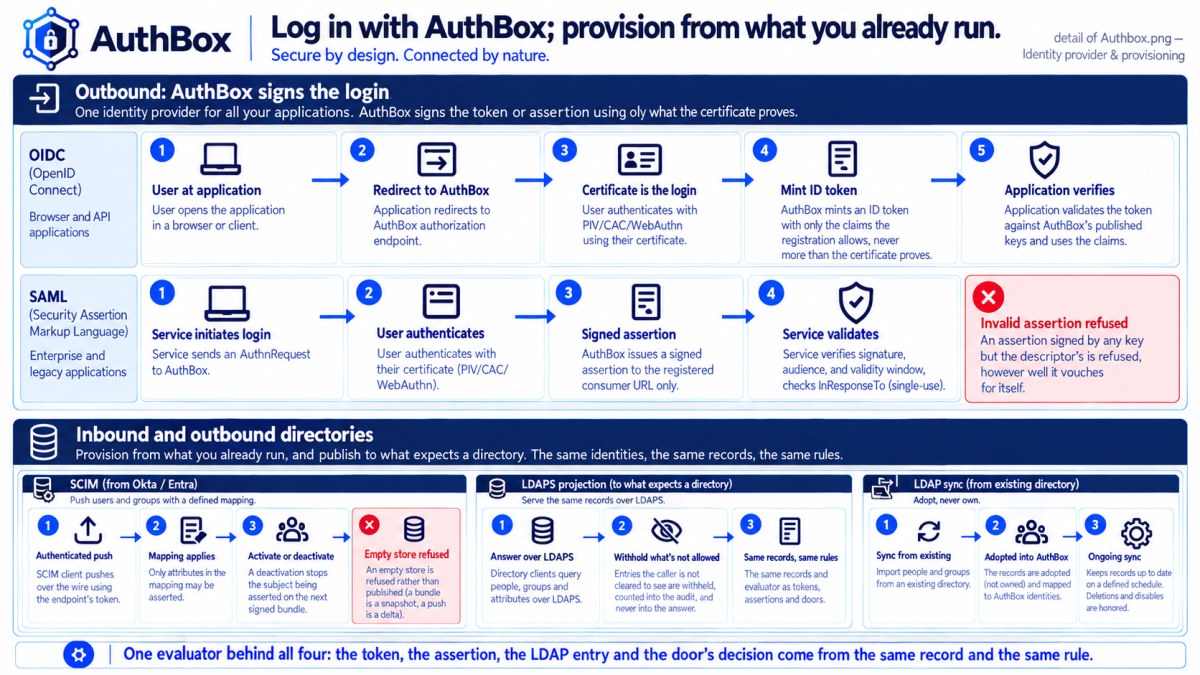
cmd/authbox-showcase-oidc (docs/plans/153 T1) is a small web application that signs a browser in through AuthBox's own OpenID Connect provider (docs/plans/014) and shows what came back. In the all-in-one composition it is fronted at login.<domain>. It exists to be read: the whole of a standards-compliant relying party — discovery, PKCE, the token exchange, verifying the ID token's signature by hand — is under three hundred lines in oidcclient.go, with no OAuth2 or OIDC library standing between that file and the wire.
What makes this login different from a password form
You never give this program a credential. Your browser presents a client certificate to the provider's /authorize endpoint — a mutual-TLS handshake this program never sees — and everything downstream of that (the authorization code, the token exchange, the ID token's claims) is this program asking the provider "what happened", authenticated with its own certificate rather than yours. RFC 8705 §2's client authentication and "the door that demands certificates" (docs/plans/014 §1) are the same sentence read from two ends of the flow.
Concretely: the OIDC provider's /authorize route runs on AuthBox's mutual-TLS enrolment listener, so reaching it at all already means your browser presented a certificate the deployment recognises. Signing in here proves nothing your certificate did not already prove — it is a worked example of an application accepting that proof through a standard protocol, not a second credential.
Trying it
- Have an enrolled certificate imported into your browser (docs/guide/enrollment.md).
- Visit
https://login.<domain>/. - Click "Log in with AuthBox". Your browser is redirected to the provider's
/authorize, presents your certificate, and is redirected straight back — there is no password prompt, no consent screen, no second factor: the certificate is the whole of the assertion. - The page renders your ID token's claims and the
/userinforesponse — your subject DN, the scopes the provider actually granted (never more than what its client registration allows, whatever-scopesthis program asks for), and the groups claim ifgroupswas among them. - "Log out" ends this program's own session — a cookie it set, not anything the provider holds — and does not touch your certificate or the provider's own state.
Restarting the process signs every browser out: it keeps no session store, on purpose, the same as the login-in-flight table keyed by the PKCE state nobody but your browser was handed. A showcase that survived a redeploy would be demonstrating its own persistence layer instead of the login it exists to show.
What it is not
Not a reference web application — no database, no CSS beyond a readable claims table. Not a second identity provider: it holds one client registration (oidc_provider.clients[].dn in the deployment's own configuration, naming this program's subject DN as client_id) and calls no other AuthBox surface.
The parts worth reading, if you are integrating your own
-issueris the only address configured; everything else (/authorize,/token,/jwks,/userinfo) is read from<issuer>/.well-known/openid-configuration(RFC 8414) at startup and never refreshed — a provider that rotates an endpoint without rotating its issuer is a provider that document does not describe.-client-idis a distinguished name, not an opaque string: the provider'saudclaim on the ID token is that same DN, canonicalised, and comparing it case-sensitively against a mixed-case-client-idflag is a real way to reject every token a correctly configured deployment issues (found live, docs/plans/153 T1's own commit history). Compare it case-insensitively.-cert/-keyauthenticate the token exchange, not the browser's login. RFC 8705's mutual-TLS client authentication: the certificate presented toPOST /tokenis how the provider knows which registered client is redeeming this code, and its subject must equal-client-idexactly — there is no client secret anywhere in this flow.- The ID token's signature is verified by hand against the keys
/jwkspublishes, because this program's whole point is showing that step rather than hiding it behind a library call.
See also
- The console, page by page — the operator's own certificate-authenticated login, one hop earlier.
- Enrolling with AuthBox — how the certificate this flow depends on is obtained.
- OIDC operations — configuring a relying party against a real deployment, and what refuses.