
Documentation embedded in this build.
Living with your certificate
Your certificate is your only credential — there is no password, no session, no second factor layered on top. This page covers what that means day to day: renewing before it expires, what an expiry warning means when you see one, and what to do if your key is lost or compromised.
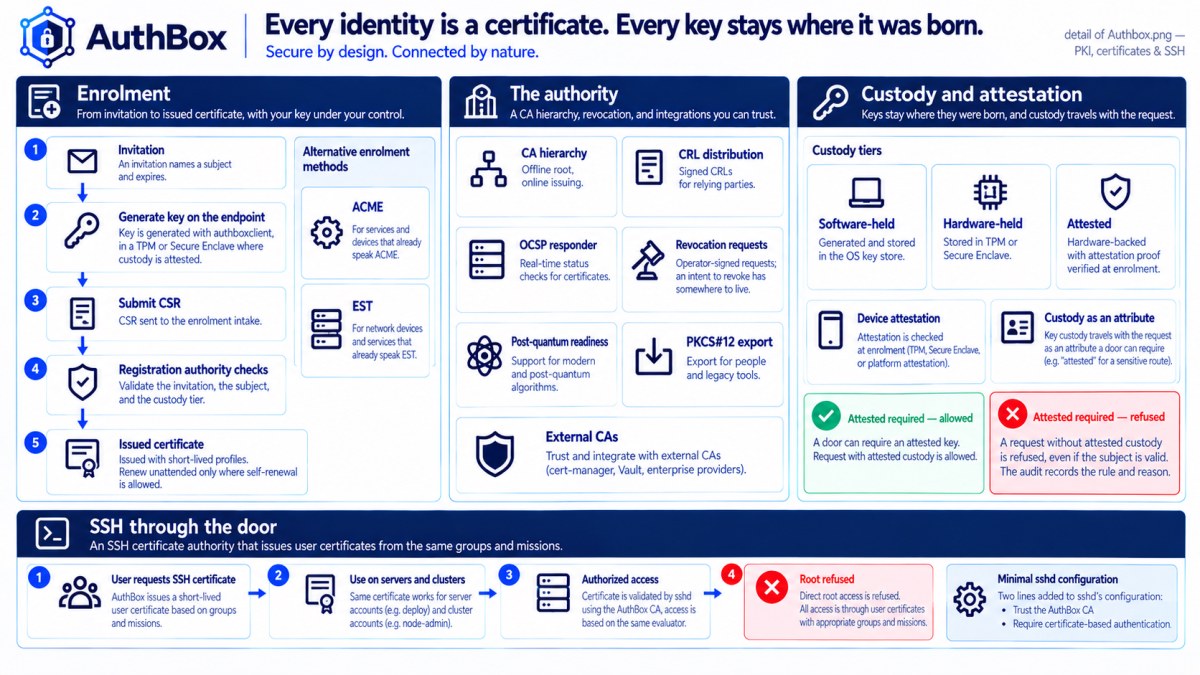
Renewal
AuthBox does not push renewals to you. For a person, renewing is enrolling again for the same subject, with a fresh key, before the old one expires — issuance stays out of band from the request path that makes authorization decisions (see ARCHITECTURE.md), so nothing about it happens on its own schedule unless you or your agent starts it.
Some identities do renew themselves, and yours almost certainly is not one of them. A deployment can grant a subject the autorenew attribute, which lets that subject present the certificate it already holds and ask for a replacement with nobody in the loop — possession proving it still has the key, the attribute proving the deployment wants it renewing unattended. That is for the services a deployment runs without a person watching: its own proxy and vault obtain their first certificate from a one-time invitation and keep themselves fresh that way afterwards. authboxclient and authbox-agent do not use it, deliberately, and the two paths below are what you have. If you are curious whether a subject holds it, it is an ordinary attribute on the entity's page in the console — and taking it away is deleting one attribute.
If you run authbox-agent, this already happens for you. The agent holds no more privilege than you have running authboxclient by hand — it renews on a schedule ahead of expiry, replaces the certificate, and marks the old credential superseded once the new one is active. Whether it reuses your existing private key or generates a fresh one is the deployment's own policy (rotation.reuse_private_key on the certificate profile); fresh is the default, because a rotation is a natural moment to stop trusting an old key rather than a reason to keep it around longer.
Renewing by hand is one command:
authboxclient renew -server https://authbox.example:8443 -ca ca.pem YOUR-CREDENTIAL-ID
authboxclient credentials list shows the ID if you have forgotten it. This generates a new key, submits a fresh enrollment for the same subject, and supersedes the old credential once the new one is active — exactly what the agent does automatically, run on your own schedule instead of one.
If your key custody was attested, renewal cannot change your key. A credential enrolled with a hardware attestation (see Enrolling with AuthBox) carries a recorded custody level, and that record was earned by a manufacturer vouching for one specific key. Renewal by possession proves you still hold that key, which is exactly why the record honestly survives it — so a renewal request carrying a DIFFERENT key is refused, naming re-enrollment as the remedy. Enrol again, with an attestation for the new key. Nothing changes for an ordinary credential: rotating your key on renewal is still normal hygiene and is still what the agent does by default.
Choosing short-lived, and what it costs
If you are the one who decides what a fleet enrols under, there is a second posture. A certificate profile can declare profiles[].short_lived, which makes the leaves it issues hours long instead of months long — twelve hours if the profile says nothing else, and never under one hour, which is refused when the deployment starts. The credential then survives by renewing, continuously, over the path described above: possession of the current key plus the autorenew attribute, on the deployment's own schedule rather than a person's. The profile tells clients when to act (profiles[].rotation.rotate_before is half its validity by default), so a service renews at half-life without being configured to.
Pick it for an unattended service, not for a person. The question is not how security-conscious the holder is, it is whether the holder can renew without anyone noticing. A proxy, a vault, a sidecar, a job runner — anything living beside the deployment that issued it, with the writer permanently reachable — is the right audience. A laptop that spends a week off the network, a person who enrols once a year at a desk, anything reaching the deployment through a link that is sometimes down: give those the ordinary profile. A credential whose whole design assumes renewal will simply stop working where renewal cannot happen.
What you gain is that revocation stops being the tool you reach for. A stolen key is useful for the hours left on the leaf rather than for the months left on a long one, and withdrawing an identity's ability to renew is one attribute delete taking effect on the next request — no list to sign, no distribution to wait for. Revocation still exists and still matters; it is simply covering an hours-long tail instead of a year-long one. Revocation, and how to need it less is the longer version of that argument.
What it costs is a dependency, and it is worth writing down before you take it. A short-lived fleet needs the writer reachable at least once per leaf lifetime. If the writer is down longer than that — a bad upgrade, a storage failure, a network partition that outlasts the validity — the fleet's certificates expire and the fleet goes with them. That is not a bug to be engineered away, it is the trade being made: continuous proof of standing, bought with a continuous dependency on the thing that grants it. Deployments that take it do so because the writer lives inside the same enclave as the fleet and is not a remote service that can disappear. If that is not true of yours, the honest answer is the ordinary profile.
How to check what a credential is running under. The issuance ledger names the profile every certificate was issued under, and it names the source — a first enrolment from an invitation, or a renewal — so a short-lived identity shows up as a run of rows for the same subject rather than one. authboxctl get certificates prints them. Renewal applies the profile the presented certificate was issued under, resolved afresh each time, so tightening a profile takes effect on the next renewal and a short-lived credential never quietly comes back long-lived.
What an expiry warning means
If you administer a deployment (or an administrator shares this with you), the console's Status page and GET /admin/v1/health both surface cert_expiry — a warning that some listener's serving certificate is running low on remaining validity. That is the server's own certificate, not yours; see server certificate renewal if you are the one operating the deployment. Your own certificate's remaining lifetime is not centrally monitored the same way — authboxclient status or credentials inspect tells you when yours expires, which is why renewing ahead of time (by hand, or with the agent) is on you rather than something the server will chase you about.
If your key is lost or compromised
Nothing online revokes a certificate in this system. Revocation is a deliberately out-of-band, airgapped workflow an administrator runs on the CA host, where the signing key lives (authboxctl crl generate; see CRL distribution). An administrator CAN now file the request online — there is a queue for exactly this, so "please revoke serial N" has somewhere to live besides somebody's memory — but filing it changes nothing on the wire: your certificate keeps working until a signed revocation list covering it reaches the deployment. What you can do immediately, yourself:
authboxclient revoke-request YOUR-CREDENTIAL-ID
This destroys the local private key right away, so a stolen laptop or a compromised disk cannot keep using it, and marks the credential revoke-requested in your local store. It does not revoke the certificate on the server — an administrator still has to get the serial onto a signed revocation list for that, which happens on the CA host and not from any web page. Tell them as soon as you can; until the list lands, the certificate remains technically valid to anyone else who might hold a copy of the key.
Importing your identity into a browser
The certificate you received and the key you generated are a pair; browsers want them in one file, PKCS#12. Package them yourself — the key was born on your machine and this keeps it there:
openssl pkcs12 -export \
    -in authbox.crt -inkey authbox.key \
    -keypbe AES-256-CBC -certpbe AES-256-CBC -macalg sha256 \
    -out authbox.p12
Pick a real passphrase when it asks — the file holds your private key. The -keypbe/-certpbe/-macalg flags matter: without them some OpenSSL builds still write the 1990s PKCS#12 encryption, which is not protection.
Import authbox.p12 through your browser or OS certificate manager, verify a page that requires your certificate loads, then delete the .p12 file. It was a transport container, not a home; the key already lives in authbox.key (or the store you imported into). And know what you traded: a key that has existed as a file can be copied like one — where that matters, ask your administrator about hardware-backed enrolment instead.
Trust anchors
If you were handed a new CA certificate — a rollover, or your first setup — install it explicitly:
authboxclient trust install authbox-ca ca.pem
By default this only changes authboxclient's own trust directory. Add -system to also copy the file to your platform's conventional CA directory — but even then, nothing runs the command that would activate it system-wide; that stays a deliberate step you or your administrator takes, never a side effect of installing a trust anchor. authboxclient trust status shows what is currently trusted.
Chaining to a hierarchy
A deployment's CA can be a single flat authority, or a root over an issuing intermediate. When it is a hierarchy, the trust anchor you install is the root — one file — and each server presents its leaf together with the intermediate that signed it, so your side needs nothing but that root. Your own certificate's issuer is the intermediate, not the root; that is expected, and it is the name that appears wherever your identity's issuer is shown.
Two shapes come up:
- One organization, one root. Everyone chains to the same root you installed; the online issuing key is the intermediate beneath it, and the root can stay offline. Nothing changes for you between a flat CA and this — one anchor either way.
- A partner you trust. To trust another agency's identities, install their root alongside yours; both anchors sit in your trust store at once. Their people chain to their root, yours to yours. Trusting a partner's PKI this way lets their certificates complete a handshake — it does not grant them any access here. Whether a valid identity may do anything is a separate decision your directory makes; a flawless certificate with no record behind it is authenticated and still refused.
An operator building such a hierarchy uses authboxctl ca mint-root to create the root and authboxctl ca mint-intermediate to create the leaf-only issuing CA the root signs; the deployment then issues leaves under the intermediate. See ARCHITECTURE §12.4a for the two models in full.