
Documentation embedded in this build.
Asking for access
Some access is not something you should have all the time. You need it this afternoon, for a particular reason, and you should stop having it when the afternoon is over.
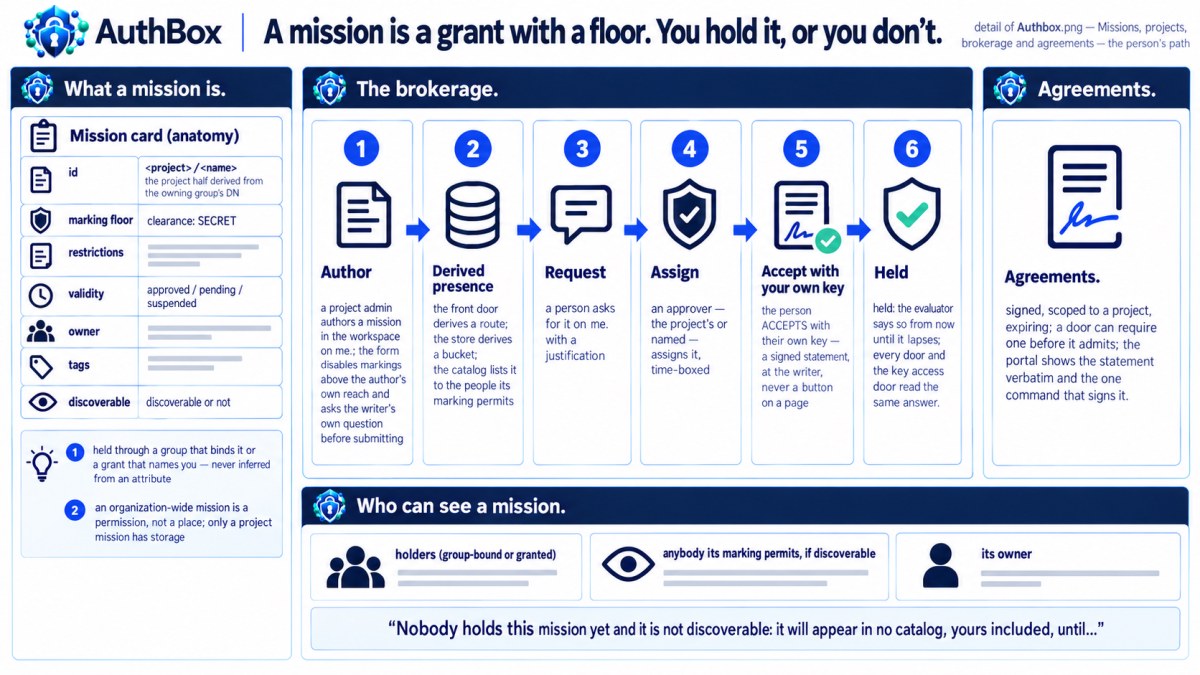
AuthBox calls that a grant: a mission, given to you specifically, with a window on it. Nothing sweeps it up when the window closes and nothing has to remember to — every decision re-checks the window, so the request after the hour ends is simply refused (plan 061).
Four steps, two people. You find a mission, you ask for it, someone with the authority assigns you a window, and you accept it with your own key. Both halves, or no access.
1. Find what you can ask for
authboxctl get missions
on a deployment serving the brokerage, the same catalog is at GET /brokerage/v1/missions.
What comes back is not the deployment's mission list. The catalog is what you are cleared to know exists — and then, within that, what you may act on.
Two things narrow it, asked in that order.
A mission carries a classification of its own. It is written in the same vocabulary your own attributes are — a level, and whatever compartments the deployment declares — and it governs who may know the mission exists as well as who may hold it. A mission your attributes do not reach is not on your catalog, is not on anybody's listing you can open, is not named in any record you can read, and answers "no such mission" if you address it directly. There is no page anywhere that shows it to you, including the operator pages: a deployment's own map of what it does is exactly the kind of thing a classification is for.
A mission is never classified lower than what it demands of the people who hold it. If holding it requires a particular level, the mission is marked at least there — the deployment cannot load a configuration where it is not, because a mission whose existence is visible below the level needed to hold it is a leak somebody would have to notice.
Then discoverability. Of the missions you may know about, the catalog offers the ones declared discoverable, the ones you already hold, and the ones you own. A mission whose existence is sensitive is never declared discoverable, and a request filed against one is refused in the same words as a request for a mission that does not exist. You cannot tell the two apart, and neither can anybody else — which is the point.
You will never see a count that gives the game away either: a listing that withholds rows reports the number of rows it drew, never the number it started from.
And a third thing, for the missions your project authored. Some of what you can ask for was not written by whoever runs the deployment: a project's admins author the project's own missions, and their identifiers say so — us.example.ops.overwatch/night-tasking, the half before the slash derived from the project's own name and never typed by anybody. A mission like that reaches the catalog of the project's members and its sub-projects' members, and nobody else's; it is not on the organization-wide catalog at all. So two colleagues with identical clearances can see different rows for a reason that has nothing to do with clearance, and the question to ask is "am I in that project" rather than "what am I cleared for".
The marking still decides first, and it is worth knowing which of the two is hiding a mission from you: being in the project and not cleared for the mission looks exactly like not being in the project, because in both cases you are told nothing at all. If you expect to see a project's mission and do not, check the clearance before you check the membership. Nothing else about asking changes — you press the same button, the project's own admins decide it, and you accept it with your own key. Your project's own missions is the page for whoever authored it.
The console shows the same thing on /ui/missions: the Ask for column marks the rows you could file against, and the mission's own page carries the form.
Or without the command line, at your own door
If the deployment serves the portal at me.<domain> you never have to type any of this. Four steps, and the page is whole in a browser running no script at all.
- Find.
/missionsis your catalog as a grid of cards, one per mission, grouped by the project each one belongs to with the organization's own last. Search matches a card's name, identifier, categories and classification at once; four rows of buttons narrow it by whether you hold it, whose mission it is, its category, and which project. Everything is a link, so a filtered catalog is a URL you can bookmark or send to somebody. - Open. Click the card. The mission's page states what AuthBox told the door about it — the identifier, the name, the classification, the categories, who looks after it, and whether you hold it — and nothing else, because there is nothing else in the catalog to say. A mission that is not on your catalog answers one 404 naming nothing, whichever of the three reasons kept it off.
- Justify. The box under the facts is a real one, six lines deep. What to put in it: who you are in this work, what you need the mission for, and for how long. It is carried word for word to the person who decides and nothing reads it on the way — not the door, not the evaluator. Nothing is required and nothing is bounded, which means the person deciding is the only bar there is.
- Ask. One button. It files the request in your name at AuthBox and sends you to
/requests, where the ticket now is. If AuthBox refuses, you get AuthBox's own status and its own sentence above the facts, with your paragraph still in the box.
Then it is step 3 and step 4 below, unchanged: somebody assigns you a window, and you accept it with your own key. The portal shows you the exact statement you will sign and every way of signing it that the deployment can actually offer you — it never signs for you, because it cannot reach your key and should not be able to.
Owners and tags
Two things on a mission are there to make the catalog usable rather than to decide anything.
Every mission may name an owner — one person, or one group. The owner is whoever you ask about it: they always see the mission, whether or not it is discoverable and whether or not they hold it, because being made responsible for something is being told about it. A group carries a classification of its own, the same way a mission does, so where the owner is a group you may not know exists the mission still names an owner you may not see rather than naming the group — you are told there is somebody responsible, which is what the field is for, and not who they are. Where a mission names no approver group, the owner is also who decides your request. An owner cannot edit the mission, though, and that is deliberate: editing replaces the whole record, classification included, and an owner lowering their own mission's classification is the disclosure this whole design exists to refuse. Edits stay with the desk that administers missions.
Tags come from a list the deployment declares, each with one sentence of what it means, and the catalog groups by them. They are a closed list rather than free text for the reason a misspelt tag is worse than no tag at all: it makes a category that exists nowhere else and that nothing else will ever file anything under. A mission tagged with a word the deployment never declared does not load.
2. Ask
authboxctl requests file -mission m-overwatch \
    -justification "covering the night watch" -open-for 72h
The justification is carried verbatim and decides nothing — it is for the person reading the queue, not for the evaluator. -open-for bounds how long the request waits to be decided; leave it out for the deployment default.
You get back an identifier. Keep it: it is what addresses the accept below.
authboxctl requests mine
shows your own requests and takes no identifier at all, which is what makes it safe for everyone to use — there is no way to phrase the question about somebody else.
Changed your mind? authboxctl requests withdraw <id>. The row stays on the board showing that you withdrew it; a queue that deleted its finished work could not answer "did anybody ever act on what I asked for".
3. Someone assigns you a window
Not you — this is the other party. An approver runs:
authboxctl requests assign req-4f2a9c… -ttl 1h -reason "night watch, one shift"
A window is required. An assignment with no expiry is a group membership written in the wrong place, and an approver who wants a standing arrangement makes one by adding you to a group. -not-after sets an absolute instant instead.
Who may approve is the deployment's declared requirement, optionally narrowed further by the mission itself: a mission may name approver groups, and then an approver must hold editor on one of them as well as satisfying the declared requirement. It never widens — a mission record cannot admit anybody the authorization map did not already admit. A refusal here never names an approver group you may not see: you are told you lack the authority, and never which group would have conferred it, because a refusal that listed them would make assignment a way of discovering exactly the groups the directory declines to show you.
An approver may also decline: authboxctl requests refuse <id> -reason "…". That is a different fact from your withdrawing it, and the board records which happened.
4. Accept — and this one you sign
Now the grant exists, and it authorizes nothing. It is waiting on you.
authboxctl requests accept req-4f2a9c…
This is the one operation in the shipped documents that requires an actor signature, and it has required one since its first release. authboxctl handles it transparently: the first attempt goes unsigned, the server refuses it with a message that says specifically that a signature is needed, and the retry signs a statement of that exact request with the same certificate and key the connection was already opened with. There is no second credential to manage.
The reason is what acceptance is. An acceptance the server merely recorded is attributable only as far as "this connection, at this time, said yes". Your signature makes it your own key vouching for it — which survives even a compromise of the server, because the server never held the key that made it. See Signing for the general form and for reading a statement before you sign it.
A browser cannot reach your certificate's key, and the console does not pretend otherwise: your request's page shows the pending acceptance and prints the exact authboxctl command rather than a button that could not work.
Unless you have registered a browser key. Where a deployment has enabled them (plan 068), the page offers a real button: it shows you the exact statement, your authenticator signs it, and the acceptance lands from the browser. That key is still your key and still not a login — you authenticated with your certificate to reach the page at all, and the browser key only added the signature. It is also subordinate to your certificate, because registering it was itself an operation your certificate key had to sign. See Signing for how to register one; the authboxctl command keeps working whether you do or not.
The moment the acceptance lands, the grant is live and the door opens.
When it ends
Three ways, and you do not have to do anything for any of them.
- The window closes. The next decision does not find a live grant. Nothing was swept, no session was killed, nothing was invalidated — the model simply re-checks.
- The mission's own validity ends. A grant cannot outlive the mission it names; both must be valid, and the refusal says which one was not.
- Somebody revokes it. Revoking a grant deletes it. There is no revoked flag, for the same reason nothing else here has one: a record left behind with a
falsebeside it is a record a later edit can flip back without anybody re-reviewing it.
Your request stays on the board reading accepted throughout. That is not stale — it records what was asked and what was decided, which remains true after the access ends, and rewriting it would destroy the only record that the access ever existed.
Asking again
Nothing stops you filing a fresh request when the window closes; that is the expected shape, not an exception. The catalog keeps showing you a mission whose grant has just expired precisely so you can — a catalog that hid it the moment your hour ran out would refuse the renewal as though the mission had never existed.